
PDF encryption
Per-template AES encryption with granular permissions — control exactly what recipients can do with the PDF.
Every CriticalPDF template can apply per-document encryption to its captures before they leave the machine. You decide, per template, what recipients can do with the file.
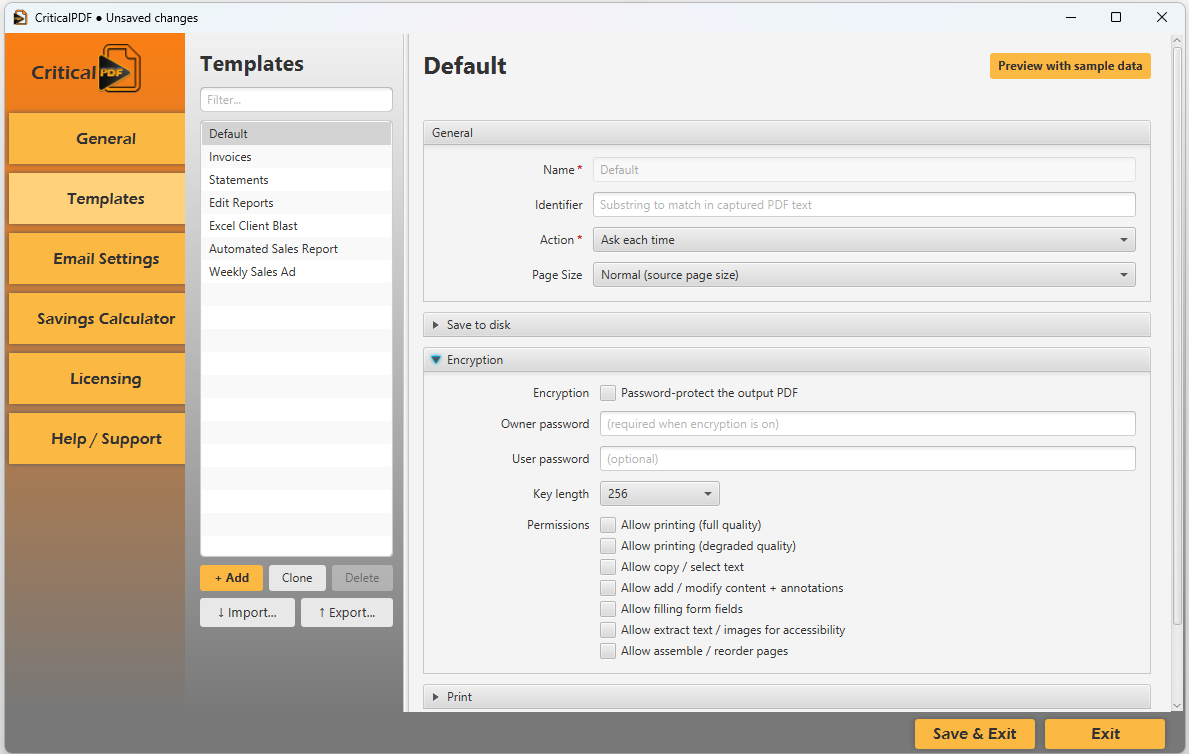
Open the Encryption section of any template:
Settings
| Field | What it does |
|---|---|
| Encryption | Checkbox: Password-protect the output PDF. When unchecked, the rest of the section is ignored and the PDF is written in the clear. |
| Owner password | Required to change the document’s restrictions. Anyone with this password can override the permission settings. |
| User password | Optional. When set, recipients need it to open the document at all. |
| Key length | 128 or 256 (default). AES-256 is recommended for new deployments. |
Permissions
Each permission is an independent checkbox. Recipients without the owner password can’t bypass these settings.
- Allow printing (full quality) — print at the PDF’s full resolution.
- Allow printing (degraded quality) — print only at a reduced resolution (faxable copy).
- Allow copy / select text — text selection and clipboard copy.
- Allow add / modify content + annotations — comments, stamps, and document editing.
- Allow filling form fields — AcroForm field input.
- Allow extract text / images for accessibility — screen-reader extraction.
- Allow assemble / reorder pages — insert, delete, or rotate pages.
Common combinations:
- Print-only customer copy — Allow printing (full quality) ✓, everything else ✗.
- Read-only archive — nothing checked, set a User password.
- Editable form — Allow printing ✓, Allow filling form fields ✓, everything else ✗.
Algorithm choice
| Key length | Notes |
|---|---|
128 | AES-128. Compatible with Acrobat 7+, broad reader support. |
256 | AES-256 (default). Compatible with Acrobat X+ and most modern PDF readers (macOS Preview, Foxit, PDF.js-based browser readers). |
If you need to send to recipients on very old PDF readers, fall back to 128. Otherwise prefer 256.
What encryption does NOT protect against
PDF encryption protects against accidental and casual misuse. It does not stop a determined attacker with the user password from screen-recording the document, photographing pages, or running a PDF that allows printing through a virtual printer to capture the rendered output.
Treat PDF encryption as policy enforcement for honest recipients, not as a digital rights management system.
Was this page helpful? Let us know.